![CoCreate-Logo_Black-RGB-1.png]](https://faq.cocreate.ink/hs-fs/hubfs/CoCreate-Logo_Black-RGB-1.png?height=40&name=CoCreate-Logo_Black-RGB-1.png)
Why add CO:CREATE to your bio?
When we asked how Clients react when they see CO:CREATE in an Artist's bio, 74% said they immediately trust that the Artist is legit.
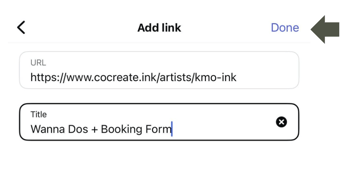
Adding a clear title to your link like "Book Custom or Wanna Dos Here" or "Book with Me" helps Clients understand exactly what to expect when they click. This small detail can make a big difference in converting profile visitors into bookings.
Step-by-Step Guide to add links to your Instagram profile:
For iPhone App
- Tap Profile or your profile picture in the bottom right
- Tap Edit profile at the top
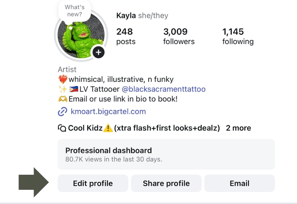
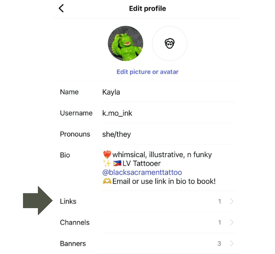
- Tap Links, then tap Add external link to add your website URL
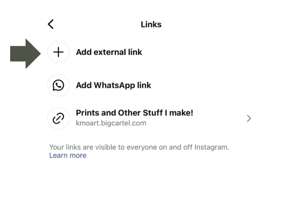
- Tap Done
- Here's how it looks live:
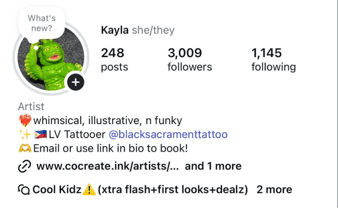
For Android App:
- Tap Profile or your profile picture in the bottom right
- Tap Edit Profile at the top
- Tap Links, then tap Add External Link to add your website URL
- Tap Accept
- Tap Accept or Done to save your changes
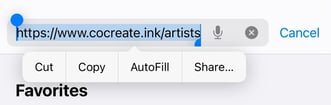
Don't know how to find your profile link? Follow these steps:
- Sign in to your CO:CREATE Artist profile
- Maneuver to the top right hamburger menu
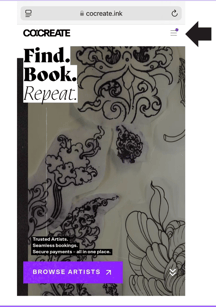
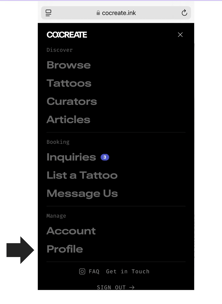
- Go to "Profile"
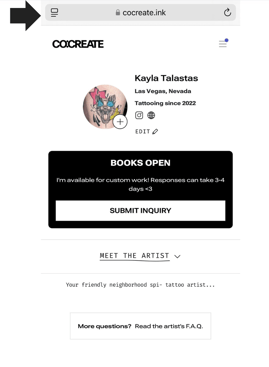
- Select and Copy your URL
Final tip: Don't be confusing.
Multiple links that all say "Book Here" leave Clients guessing. If you're booking for different shops, guest spots, or personal work, label each link specifically so Clients know exactly where they're headed. Clear titles mean more bookings, not more confusion.