![CoCreate-Logo_Black-RGB-1.png]](https://faq.cocreate.ink/hs-fs/hubfs/CoCreate-Logo_Black-RGB-1.png?height=40&name=CoCreate-Logo_Black-RGB-1.png)
There are three ways to add a new Wanna Do Design:
- From the hamburger menu. Tap the menu icon (top right), then Add a Wanna Do.
- From your Profile Settings page. Tap the menu icon, then Profile, then Wanna Dos, then tap ADD A WANNA DO.
- From your profile in edit mode (new). Open your profile, tap EDIT, scroll to the Wanna Do Designs section, then tap ADD A WANNA DO.
Whichever entry point you pick, the setup steps are the same.
Steps to List a Wanna Do:
- Upload your design
- Upload an image of your design as-is or mocked up in your preferred placement/composition
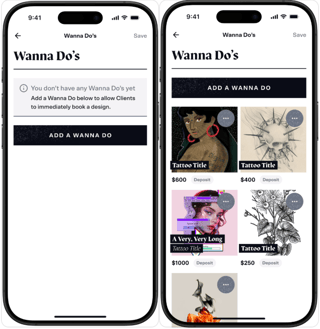
- Upload an image of your design as-is or mocked up in your preferred placement/composition
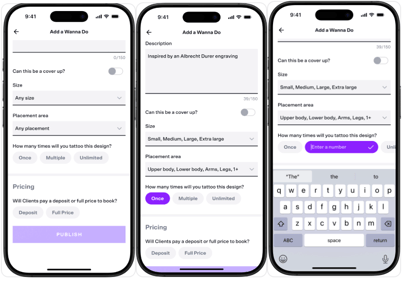
- Add details
- Title: Name your design
- Description: Add context, general pricing, sessions needed, or any details you want clients to know
- Cover-up option: Toggle on if this design can work as a cover-up
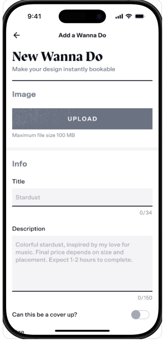
- Set size and placement preferences
- Select your preferred sizes and placements from the dropdown menus
- These options help clients know your vision for the piece and ensure whoever claims the design is aligned with your plan for the Wanna Do.
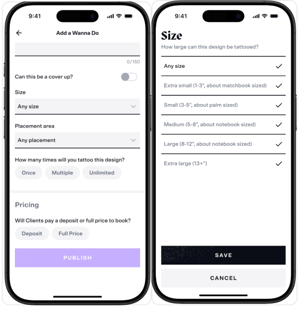
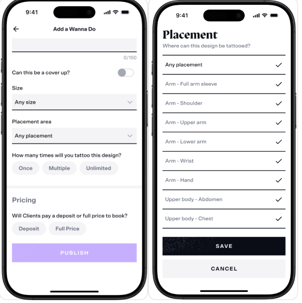
- Choose how many times you'll tattoo this design:
- Once: One of one, not able to be repeated
- Multiple: Set a specific number of times the design can be tattooed
- Unlimited: Repeatable indefinitely
- Set your pricing:
- Deposit Pricing: Display your deposit amount. Best if the final total varies by size, placement, etc. Client pays the balance day-of.
- Full Price: Display the complete session cost. Client pays upfront with no balance
due at their appointment.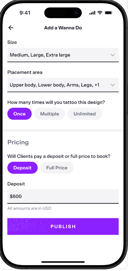
- Publish!
-
- Click "Publish" to make your Wanna Do live
- Add another anytime

Need help managing or editing your Wanna Do's? Contact support@cocreate.ink