![CoCreate-Logo_Black-RGB-1.png]](https://faq.cocreate.ink/hs-fs/hubfs/CoCreate-Logo_Black-RGB-1.png?height=40&name=CoCreate-Logo_Black-RGB-1.png)
Do I need to customize my Custom Booking Form?
No. The form comes pre-configured with 14 recommended questions and is ready to accept bookings. You can toggle questions on/off to customize it if you'd like.
No. The form comes pre-configured with 14 recommended questions and is ready to accept bookings. You can toggle questions on/off to customize it if you'd like.
Can I turn off Custom Bookings?
Yes. If you're not accepting custom work, you can toggle the Custom Booking Form off.
Yes. If you're not accepting custom work, you can toggle the Custom Booking Form off.
Steps to Update Your Form:
- Access your profile settings
*Tap the menu icon (top right) → "Profile" → "Custom Booking Form" - Add a Client Welcome Message (optional)
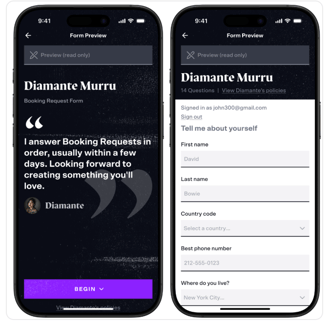
- This message appears when clients start a booking request
- Include a warm greeting or your typical response timeline

- Customize questions
- Use the toggles to turn questions on/off or mark them as required

- Use the toggles to turn questions on/off or mark them as required
- Save your changes
- Click "Save" (top right) whenever you make updates
Preview Your Form
Want to see what clients experience? Click "Preview" to make sure everything looks right before going live.