![CoCreate-Logo_Black-RGB-1.png]](https://faq.cocreate.ink/hs-fs/hubfs/CoCreate-Logo_Black-RGB-1.png?height=40&name=CoCreate-Logo_Black-RGB-1.png)
Account Settings:
- Personal info (name, email, phone number)
- Stripe connection (required to take Deposits and Session Payments, optional for sharing your profile publicly)
- Notification preferences
Q: Can I turn off notifications?
A: Email notifications for booking updates are always required. All other notifications (SMS, push) are optional and can be toggled on/off in your settings.
- Tap the menu icon → Account
- Maneuver to “Notifications”
- Use the toggles to choose your preferences for Booking and Marketing notifications
- Click “Save” on the top right of the page
- Connect your Stripe account for payments
When linking your bank to Stripe, you will be redirected to an external browser. Need guidance? See Payments on CO:CREATE
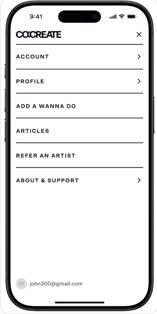


Looking for your bio, portfolio, pricing, policies, FAQs, or Locations? Those are profile settings, not account settings. You can edit them inline on your profile, or open the hamburger menu and tap Profile. See Editing Your Profile.